Samsung Galaxy Tab 7-inch (Sprint)


Product Description

The Samsung Galaxy Tab brings you the media you want and keeps you connected with anyone, anytime. Compact and light, you can keep in touch with people and content through 3G connectivity, Wi-Fi 802.11 b/g/n or Bluetooth Wireless Technology 3.0. With a battery life of up to 13 hours and a crisp TFT-LCD display, you're free to communicate, update, and enjoy.

Product Details

  • Color: Black
  • Brand: Samsung
  • Model: Galaxy BBSPHP1TAB
  • Dimensions: 4.74" h x .47" w x 7.48" l, 1.00 pounds

Features

  • Android 2.2-powered mobile tablet with 7-inch touchscreen; 3G Mobile Hot Spot connectivity for up to 5 devices
  • Rear 3-MP camera for photos and video; front-facing 1.3-MP camera for video chats; 2 GB internal memory plus included 16 GB microSD card
  • Ultra-fast Wireless-N Wi-Fi; Bluetoothe 3.0 connectivity; multi-format digital media player; access to Sprint TV and Sprint Music Plus
  • Up to 13 hours of battery power from 4000 mAh battery; released in November, 2010
  • What's in the Box: Galaxy Tab, rechargeable battery, charger, 16 GB microSD memory card, quick start guide
»»  Read More ...

Google Vs Facebook


After a few Google attempts failed in setting up their own versions of social media, Google's recent Google Buzz is now preparing to set up a site or service called Circles that many observers believed the social media site to rival Facebook and Twitter in the realm of social media. This news is exhaled by a site, readwriteweb.com by stating as follows: "We believe That Google will preview a major new social service called Google Circles at South by Southwest Interactive today". It seems Google should be to launch a website of their own social media if you do not want to compete or even in the near left behind by Facebook.

Economic value in the realm of social media is very high, mostly enjoyed by Facebook. It is conceivable now more than 642 million people are regular users of Facebook, 70% of which are outside the United States. The market value of Facebook is also continuously increased to reach 65 billion U.S. dollars. But news of the launch of social media sites Google version is directly contradicted by Google by saying that:

"Google has now denied Officially Circles That will launch here, but not that it exists. See below the final update, as of afternoon Texas time Google does now deny That Circles exists ".


According readwriteweb.com itself an indication of social media sites Google's version is quite strong. If later indication is correct, Google's services to be provided will offer photos, videos and share your status message. All users share the Rings, users will only be shared with the most appropriate circle of social contacts in their lives, meaning that unlike Facebook which share information about its users to all users, Circles will only allow contact with members of the circle corresponding to the user, so most not be more secure than Facebook which claimed often neglect the privacy of its users. Still according to the same site Circles will likely be displayed in an event by the ACLU, an organization that focuses on privacy and freedom. Although not believed to officially launch, but it is clear that the Circles are the major products Google in the realm of social media are expected to compete with Facebook and Twitter.


Circles service has been developed with active participation from Chris Messina, co-creator of social phenomena and successful online software, ranging from BarCamp, Hashtags and more. Messina himself refused to comment on this. In addition there is the name of Jonathan Sposato, CEO picnic photo editing service that Google acquired last year. Sposato is the person who sold two start-ups to Google earlier, one of which Phatbits, a service that was acquired by Google in 2005 which later became Google Gadgets.


Yet again Google denied this and said that no products currently under development. Google told Liz Gannes on the technology blog All Things D That they did not prepare anything. Liz Ganes himself stated that:


"When a report emerged this morning of a new social network focused on sharing nuanced called Google Circles, the company said it was not launching anything this week at SXSW. But Such a product is not even under development, Supposedly According to the people developing it. Google's Chris Messina, WHO had been pegged as one of the leaders of Circles, of toll me directly today That he "did not know what [the story] was talking about."

 
However, despite continued disputed by Google, at least later if it is really launched, Circles believed to offer something much different than Facebook or Twitter. So far, there is a doubt, especially on Facebook where a service user is in a large bucket that can not limit their privacy despite the fact that it is set as tight and as good as possible. A facebook user profile information can even be seen clearly by any user for privacy advocates that it is not very convenient. The converse to this, Circles is believed to limit the interaction of its users in accordance with their circle and fit it is with life off line users. This means that users Circles will indeed be limited to certain circles and selected according to user's life off line Circles, certainly an improvement compared with the areas of privacy that Facebook continues to get criticism, not half-hearted members of the senate of the United States alone.


Later Circles believed possible to communicate different things to different people in different situations. This means that there are circles of communication that is limited to certain things, such as classmates, coworkers, and family. All this in an existing social media everyone can see the activities of other users directly, but in Circles later this possibility can not be done so that more secure privacy.


Circles sources say that the development of the former possibility is strongly influenced by the social researcher Google technology, namely Paul Adams. Adams has written a book called Social Circles, which will be released this summer and he is a great deal about what is wrong with social networks, particularly the lack of respect and human context. Adams worked in the User Experience Google for four years, but only a few months after publishing a presentation about what is wrong with social networks, he left Google and moved to Facebook.


Circles later, according to people who are believed to develop as social ramahnya with other Google products, but there is greater emphasis to the design and usability. With Messina and Sposato behind him, which no doubt their quality and reliability, Circles are believed to be the next effort from Google to be in combat in social media with Facebook and Twitter. As is known, Google has done much to create a site or social measures in order to compete with Facebook, but still they continue to be behind Facebook. Almost none of Google's attempt to rival Facebook in the realm of social media to reap success. It is certainly curious and motivated to make Google more quickly in the realm.


We can mebuat list, ranging from Google Buzz, Google Wave, and Google's Open Social none could be a potent killer Facebook. In December 2010, which then appear on the site techcrunch.com a screenshot that shows the tool bar at google.com website and called the Loop, but until now not clear where it goes the tool bar. Sources in readwriteweb.com stated that Loop is the same product with Circles.


Worth the wait exactly what Google's site or service that will soon be launched and become a potent weapon for Facebook killer in the realm of social media. If once again failed to produce a service that Google can at least compete with Facebook, of their ability as a king on the Internet is increasingly in doubt. Google may also need to realize that social media is not their rations.
»»  Read More ...

Blue Track Technology

Microsoft will soon launch a new mouse button, Blue Track Technology, Laser Mouse Substitute. This mouse will be using the latest technology, called Blue Track. This technology would later replace the of laser or optical mouse button. The technology uses a blue LED combined with wide-angle lens. Blue LEDs makes this mouse it look more attractive. Blue Track Technology This has the better tracking on capability than an optical mouse button laser mouse and normal on the surface of that can not be applied to of laser mouse button.
»»  Read More ...

Acer Predator Aspire G7700


Who would have thought today's most sophisticated computer brands held by the ace. Acer Aspire Predator G7700. Surprises are successfully presented Acer as a global technology company behind Dell and Hewlett-Packard, which controls the world to share a desktop or notebook computer sales, is the price set for the Predator to reach 5,000 U.S. dollars or about Rp 50 million LCD monitor complete with size 24 inches (60.96 cm diagonal).

The other surprise was the design world's most expensive desktop computer is a very futuristic millennium in shades of orange, as well as a design similar to robots capable of metamorphosed as in the movie Transformers. The difference, Acer Predator could not be a robot, but a very nice sophisticated computers when used for gaming.

The overall design of the Acer Predator is intact with the choice of the best components available to design a computer monitor with a wide high-definition resolution, two sets of optical cross section of the DVD to HDTV and BluRay technology allows the Acer Predator became the center of digital cinema, as well as the completeness of the keyboard and mouse made by Logitech specifically designed to make the Acer Predator (hunters) that outperform rival machines.

Features of technology

Acer Predator is designed to use Intel's flagship processor Extreme Edition QX9650 Corp. Quad2Core using four computational core with a speed of 3 GHz and 4 GB of memory. Running using the operating system Windows Vista Home Premium 64-bit, Acer Predator is a hungry machine power using 1,000 watts power supply.

The product is not sold freely on the market these two devices using the interface of artificial nVidia GeForce 9800 GTX, generate graphics processor capabilities are fast, fun for anyone who spends time enjoying digital games are developed intuitively.

The use of a very powerful graphics processors, among others who also absorbed so much power. Apparently, Acer wants to maximize the presence of computer technology is now provided, by holding all the latest components, makes the Acer Predator is not only fun to play and enjoyed as a center for high-definition digital cinema, but also fun to use for other heavy work that requires a graphics processor resources is great. Those who edit movies or digital photos in a massive amount and length of time that could be considered to make the Predator as the main engine speed or unreliable because they contain technological features
»»  Read More ...

Finger Mouse

Want to work faster?
Unique mouse to work faster at the computer. No need to reach the mouse or moving the hands from the keyboard, right click on the nearest place. Can type while moving the mouse. 


Lazy mouse finger to reach the mouse while typing?
If the distance is too far away from the mouse, the hand will be sore. With the finger mouse does not need to grab the mouse on the table, above the keyboard can. 


This cute mouse can work on any surface. Light button, a little touched already click. The shape is cool, new mouse models. 


Move faster. Unique mouse is lightweight and can move in a wider range than a conventional mouse is heavy.

May seem a little awkward when you first use this unique mouse. Ever see a person first learned to use a mouse? There are tips, change the mouse speed setting to the slow speed (control panel>> printers & other hardware>> mouse>> pointer options>> select a pointer speed). To click or double click, so as not to shake when clicking, point the pointer to the direction that will be clicked, lift a little and click. 


So used, so your old mouse is not used anymore. Because this finger mouse to use a lot of fun. The right hand no longer need to grab the mouse, with whatever surface the mouse is so, even at the top of the keyboard can! I add a sponge to slit the keyboard as a mouse pad .. check the bottom picture. 


For laptops, this mouse is well suited to put in a bag because the size is smaller than a conventional mouse.
»»  Read More ...

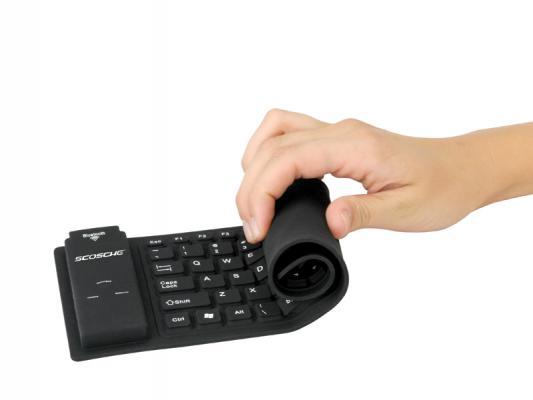
Waterproof Keyboard


The keyboard can be rolled up are not a new product. Many people already use IT support. The advantageto rely on the type of keyboard which can be rolled up to allow you the time taken for its compact size.

Keyboard roll-dominated mostly uses material from the rubber. Makes it can survive if exposed to splashes of water, and undisturbed dust that can squeeze the most conventional keyboards.

Unlike the similar keyboard, Roll-Up Keyboard has a button that arise so that users seemed to use aconventional keyboard or on a notebook. Several large buttons such as Enter, backspace, and the Spacebar,equipped with 2 or 3 sensors so that when typing accuracy is better than most keyboard rolls that have beenpreviously available.

There is an option connector PS / 2 and USB keyboard with 104 keys a number of these pieces, includingNumpad keys (number keys 0-9 and a few other key function is additional calculations). Ketahannya claimed to diguankan until pressed as many as 15 million times.
»»  Read More ...

Comparison of Intel with AMD


In recent years, the processor usage on computers has grown very quickly. The use of computers plays a very important for various aspects of life, especially in the core hardware of the computer is often called the CPU or processor.

In general, the processor is made to the performance at the computer so much faster when we use to bebbagai thing, that is video editing and 3D programs.

At this time also the comparison between Intel and AMD processors are very competitive, especially on the velocity performance of these processors. Both of these processors each year always shows new face of the brand of their processors on Core i7 INTEL and AMD Phenom X4.

So for this case, both of these processors on the HP company entered into a collaboration, especially on a notebook, which HP notebook is menggukan INTEL and AMD chips as well as for the ATI Radeon graphics cards.
»»  Read More ...

Myths about processor AMD


Using a notebook with AMD processors? There are still many PC users are hesitant to use the processor on this one. There are several "myths" that makes the AMD processors are considered unfavorable. However, whether the "myths" are true? Let us discuss one by one.

Hot

Yes, this is the first thing that will be talked about a lot of people. AMD's processor heat. This assumption comes from the past. Formerly, in the early days of rampant AMD processor was introduced to the market, it tends to heat the processor. Actually, this heat is lost due to the production process of small competitors. In addition, the cooling technology in that era are still quite poorly.

Over time, AMD managed to improve these conditions. In fact, Athlon64 processor (64-bit) initial version is a processor that is very cold. Advancement of manufacturing processes coupled with cool and quiet technology in the range of end 2003, making AMD processors into one of the coldest. Unfortunately, this condition is not realized by many people.

Currently, AMD processors are able to offer as cold as its competitors. Acer Aspire 4552 that use AMD processors can work (full) with a temperature range of 40-55 C. In this condition, there is no burning sensation that disturb the surface of the keyboard or on the bottom. Why is that? Because the cooling methods and technologies used AMD has been able to cope with excessive temperature. So, the myth about high temperatures on AMD processors we state this formally incorrect.

Slow

As a "new player" in the world of CPUs (when compared with its competitors), it's normal in the presence of early AMD processors have not been able to compete in terms of performance. However, this occurred in the late '90s. When AMD succeeded in presenting a series Athlon processor, things were changing. Processor AMD Athlon first launched in 1999 it succeeded in shocking the world because of the advanced architecture and the speed and stability.

Currently, AMD processors have even used in large servers for the corporate. It is not strange, considering the first AMD Athlon architecture is derived from the company that produces enterprise-class server. Technologies such as SSE and MMX AMD also successfully obtained and used in its current processor. In addition, modern features such as integrated memory controller was already owns. Seeing these facts, it can be concluded that the myth of "slow AMD processor" is also incorrect.

Not Compatible

AMD processors used in PCs (desktops and notebooks) refers to a standard equal to any other PC processors, the x86. So, compatibility problems should not arise at all. And in fact, does not exist. You can use a variety of commonly used applications, in systems that use AMD processors.

Since AMD now holds a market share of the processor (the world) in the range of 20%, of course, no software company will make its software is not compatible with AMD, is not it? In addition, saw many companies that rely on AMD as the "motor" corporate servers, this means that AMD is considered to be ready to adapt to various conditions. In the end, you can make sense for yourself whether this myth is true or not, is not it?

Image Right: Fast and Affordable

Since a long time, AMD is trying to offer an alternative processor that has a high-performance but more affordable prices. All this managed to accomplish since the presence of the Athlon. 11 years after the first Athlon present in the market, AMD is still consistent with this idea. In fact, for economical desktop PCs, AMD is actually the last few years has become a very popular choice. High technology and total system at an affordable price becomes the main attraction.

Acer Aspire 4552: Fit for Students

A notebook that is offered at very affordable prices. Non-OS version you can "nut" to fund 3 million alone. Why so? Is Acer slashed its performance? No. Acer utilize the processor and the AMD system on this notebook. Processor equipped with a reliable and powerful graphics system makes it present to compete with notebooks that cost could reach 1 million dollars more expensive.

High Performance: Students today require high performance for everyday applications such as photo editing, do chores, make presentations, and many other things. Aspire 4552 comes with AMD Athlon processor 2.2 GHz dual core P340. This processor is equipped with an integrated memory controller and DDR3 which makes high-performance.

Battery: Battery life is becoming a necessity. Students will need a battery life of at least 3 hours to be noted in a lecture. Aspire 4552 offers the durability of up to 4 hours more. The combination of power saving technology enables AMD and Acer is done at an affordable notebook.

Gaming: Youth must be filled with joy. Playing games is one of the recreational facilities and student youth of today. Acer Aspire 4552 is equipped with ATI Radeon HD 4250, able to accommodate these aspirations. Games like Left4Dead, The Sims, Counter Strike, and the like, can be played with the Aspire 4552.

In the end, the Aspire 4552 with AMD processors to be the perfect choice for the student / students who require high-performance notebooks and economical. Extinct been periods in which the student is a notebook cheap notebooks are "slow" with low battery life
»»  Read More ...

IPad vs Netbook vs. Notebook


In recent years, the netbook is able to dominate the market as fast as lightning. With the Intel Atom chip set, battery life is long enough, compact and relatively cheap price able to break an expensive laptop market gambot. But with the coming onslaught of cheap laptops and the presence of Apple's latest product, iPad, might interfere with the popularity of netbooks. A research center named Retrevo Pulse has been conducting research to provide some questions to owners of netbooks, laptops and iPad about what products they consider most and what they will buy. Here are the results


Is iPad kill Netbook?
When Steve Jobs announced the presence of magic gadgets, Apple iPad, in January, many observers are predicting the netbook market will be suspended. About 30% of buyers choice to divert any netbook iPad.


And when the iPad and all its variations began circulating on various Apple Store, forcing the customer to fight with a choice between the iPad or Netbook. And the result is about 78% of them prefer to buy the iPad.


Is killing Netbook Laptop?
Offers a full-sized laptop keyboard, wide screen, optical drive and now the battery life is longer. Although they are not as "portable" netbook, but recently started to emerge Berbandrol cheap laptops. And the result is 65% of customers choosing a laptop and the rest decided to buy a netbook.


A similar story applies to those who are deciding between buying a laptop or netbook this year. 35% of them believe will make up for netbooks and 65% is determined that the laptop is the best choice.


Are Netbooks Still Attractive?
Many assume that the dimensions are small with a cheaper price and its ability to more quickly plus battery life is longer into features that can attract customers.
»»  Read More ...

difference between Intel Core i5 i7


When buying a high end laptop, you may have experienced difficulty in choosing between a laptop with Intel Core i5 or Intel Intel Core i7, considering the price range between the two laptops are quite significant. 

Well let me you're not confused, here is the difference between Intel Intel Core processors and Intel Core i7 i5
First, as we know Intel Core i5 is a version of 'saving' of Intel Core i7. The real difference from the Intel Core and Intel Core i7 i5 is the chipset and socket. Intel Core i5 using the LGA1156 socket with a P55 chipset (and even the H55, H57 or Q57), while the Intel Core i7 socket LGA1366 and generally use the X58 chipset, this certainly influenced the performance differences of these two types of processors. Intel Core i5 available at a cheaper price but the performance is far below Intel's Core i7. 


A second difference is the Turbo Mode feature, which Intel Core i7 processors have been equipped with Turbo Mode feature that lets Intel Core i7 overclock itself. For example the original speed is 3.2Ghz Intel Core i7, when you play games that require the extra performance, the Intel Core i7 processor will automatically mengoverclok speed to the level of 3.46Ghz. 


Third, Intel Core i7 processors generally use DDR3 Triple Channel memory (although some are using dual channel), in contrast with Intel Core i5 using dual channel memory, this will certainly affect the performance of your laptop. 


The real difference is the fourth of the features of Hyper Threading, Intel's Core i7 has a quad core even in Windows reads as eight cores, so the ability to perform multi-threading operation was undoubtedly, in contrast with Intel Core i5 that there are not even equipped with this feature. 


In conclusion, if you want a high end processor performance, capable of operating multi-threading then choose the Intel Core i7, but certainly more expensive than the Intel Core i5. 


What about the Intel Core I3? Processors of this type is a class of low-end processors compared to Intel Core and Intel Core i7 i5. Basically Intel Core I3 is almost similar to the Intel Core 2 Duo, Intel Core processors only I3 has been equipped with the capabilities of the Intel i7 processors or i5 Series except for the Turbo Boost feature.
»»  Read More ...

Step Debian Linux installation


STEP I
Preparation Installing Linux (Debian)
Turn on the computer, then press [delete] to enter the bios,
Once inside the bios, select the menu
BIOS FEATURES SETUP
press [ENTER]
After that, choose the Boot Sequence menu in order to CDROM, C, A
[ESC]
Select,
SAVE & EXIT SETUP
press [ENTER]
press y [ENTER]
Then the computer will start booting again with the boot sequence to CDROM first.
Insert the CD into the CDROM existing debian.
STEP II
Boot from CD
After inserting the CD into the CDROM then just wait for the CD boot.
After the computer booted to the CD, will appear as follows:
Welcome to Deal
This is debian ...........................................
.................................................. ........
boot: _ [ENTER]
STEP III
Initial Installation Options
After that the computer will be loading ...
Wait until it says the following:
'Choose The Language "
Select a language (preferably English - en). [ENTER]
'Choose Language Variant "
Select 'Classic (United States)' [ENTER].
'Relase Notes'
Select [ENTER].
'Debian GNU / Linux Installation Main Menu'
There will be various options in the box with the highlighted part
on the choice of the top with the words,
Next: Configure the Keyboard
press [ENTER].
'Select a Keyboard'
There will be various options in the box with the highlighted part
select,
qwerty / us: U.S. Classic (QWERTY)
[ENTER]
STEP IV
Determining Partition Hardisk
'Debian GNU / Linux Installation Main Menu'
There will be various options in the box with the highlighted part
on the choice of the top with the words,
Next: Initialize and Activate a Swap Partition
select,
Previous: Partition a Hard Disk
[ENTER]
'Select Disk Drive'
select,
/ Dev / hda
[ENTER]
'Lilo Limitations'
[ENTER]
'Note on additional space for the ReiserFS Journal'
[ENTER]
Display will show the existing partitions on your hard disk hda, with this information you will know where the swap partition and the location of the partition where you would put a '/' (root).
select [Quit]
by moving / pressing the arrow to the right. [ENTER]
STEP V
Initialize the Swap Partition
'Debian GNU / Linux Installation Main Menu'
There will be various options in the box with the highlighted section on the choice of the top with the words,
Next: Initialize and Activate a Swap Partition
[ENTER]
'Scan for Bad Blocks? '
select [ENTER]
'Are You Sure? '
select [ENTER]
STEP VI
Selecting the type of File System on Linux Partitions
'Debian GNU / Linux Installation Main Menu'
There will be various options in the box with the highlighted part
on the choice of the top with the words,
Next: Initialize a Linux Partition
[ENTER]
'Choose Filesystem Type'
There are 3 options on the box, select,
Ext3: Next Generation of Ext2, a journaling filesystem
[ENTER]
'Select Partition'
Select the partition that will be used as "Ext3"
There are 3 options on the box, select,
/ Dev/hda2: Linux native
[ENTER]
'Scan for Bad Blocks? '
select [ENTER]
'Are You Sure? '
Consider carefully whether you choose / dev/hda2 as "Ext3" if it is correct
select [ENTER]
'Mount as the Root Filesystem? '
select [ENTER]
STEP VII
Installing the Kernel and modules
'Debian GNU / Linux Installation Main Menu'
There will be various options in the box with the highlighted section on the choice of the top with the words,
Next: Install the kernel and Driver Modules
[ENTER]
'Select Installation Medium'
select,
cdrom: CD-ROM drive
[ENTER]
'Please insert the CD-ROM'
select [ENTER]
'Please Wait'
'Select Archive path'
Select the directory where to install the kernel.
/ Instmnt/dists/woody/main/disks-i386/current
[ENTER]
'Please Wait'
STEP VIII
Choosing a Driver
'Debian GNU / Linux Installation Main Menu'
There will be various options in the box with the highlighted part
on the choice of the top with the words,
Next: Configure Device Driver Modules
[ENTER]
'Note about loaded drivers'
select, [ENTER]
'Select Category'
Would appear that the options module will be selected,
1. Select 'kernel / drivers / input Input Devices. '[ENTER]
'Select kernel / drivers / input modules'
select,
'Kebdev - Keyboard support' [ENTER]
'Kebdev'
select, [ENTER]
'Enter Command-Line Argumens'
No need to fill anything.
[ENTER]
select,
'Mousedev - Mouse support' [ENTER]
'Mousedev'
select, [ENTER]
'Enter Command-Line Argumens'
No need to fill anything.
[ENTER]
Select 'Exit Finish Return to previous menu. '[ENTER]
2. Select 'kernel / drivers / net Drivers for network interface cards' [ENTER]
'Select kernel / drivers / net modules'
look for 'eepro100' [ENTER]
'Eepro100'
select, [ENTER]
or if the failure can try bonding
'Enter Command-Line Argumens'
No need to fill anything. [ENTER]
Select 'Exit Finish Return to previous menu. '[ENTER]
3. Select 'kernel / fs / msdos
MS-DOS file system '[ENTER]
'Select kernel / fs / msdos modules'
select, 'msdos - PC BIOS' [ENTER]
'Msdos'
select, [ENTER]
'Enter Command-Line Argumens'
No need to fill anything.
[ENTER]
Select 'Exit Finish Return to previous menu. '[ENTER]
4. Select 'kernel/arch/1386/kernel i386-base drivers. '[ENTER]
select, 'apm' [ENTER]
'Apm'
select, [ENTER]
'Enter Command-Line Argumens'
No need to fill anything.
[ENTER]
select, 'CPUID' [ENTER]
'CPUID'
select, [ENTER]
'Enter Command-Line Argumens'
No need to fill anything.
[ENTER]
Select 'Exit Finish Return to previous menu. '[ENTER]
Select 'Exit' [ENTER]
STEP IX
Configure Network
'Debian GNU / Linux Installation Main Menu'
There will be various options in the box with the highlighted part
on the choice of the top with the words,
Next: Configure the network
[ENTER]
'Choose The Hostname'
Replace the word 'Debian' with 'LAB-OS-27-***'
*** Replaced with a computer number.
[ENTER]
'Automatic Network Configuration'
select, [ENTER]
'Choose the IP Address'
Change the default with '152.118.27 .***'
*** Replaced with a computer number.
[ENTER]
'Choose Network Mask'
No need to be replaced.
[ENTER]
'What is your IP Gateway address? '
152.118.27.1
[ENTER]
'Choose Domain Name'
Write 'cs.ui.ac.id'
[ENTER]
'Choose the DNS Server Addresses'
Replace with '152.118.24.2'
[ENTER]
STEP X
Installing Base System
'Debian GNU / Linux Installation Main Menu'
There will be various options in the box with the part in
highlights on the top choice with the words,
Next: Install the base system
[ENTER]
'Select Installation Medium'
select,
'Cdrom: CD-ROM drive'
[ENTER]
'Please insert the CD-ROM'
select, [ENTER]
'Select Archive path'
Select a directory to install the base system.
/ Instmnt
[ENTER]
"Installing Base System, please wait '
Wait until finished installing.
STEP XI
Creating a Bootable System Being
'Debian GNU / Linux Installation Main Menu'
There will be various options in the box with the highlighted part
on the choice of the top with the words,
Next: Make System Bootable
[ENTER]
'When Should the LILO boot loader be installed? '
Select,
/ Dev / hda: Install LILO in the MBR (use this if unsure).
[ENTER]
'Other bootable partitions'
Select,
Include Put all into the menu.
[ENTER]
'Securing LILO'
[ENTER]
STEP XII
Creating a Boot Floppy
'Debian GNU / Linux Installation Main Menu'
There will be various options in the box with the highlighted part
on the choice of the top with the words,
Next: Make a Boot Floppy
Insert the diskette (in good condition) into the floppy disk
[ENTER]
'Change Disk'
[ENTER]
Wait while making a boot floppy
STEP XIII
Computer rebooting
'Debian GNU / Linux Installation Main Menu'
There will be various options in the box with the highlighted part
on the choice of the top with the words,
Next: Rebooting the System
[ENTER]
"Rebooting the System? '
Select,
Yes [ENTER]
Then remove the floppy from the floppy disk, while the computer is rebooted.
Remove it from the cdrom cd deal.
Wait until the lilo boot as below,
Linux
WIN / Dos
Choose Linux [ENTER]
STEP XIV
Debian System Configuration
Then it will go into the display as below:
'Debian System Configuration'
[ENTER]
'TimeZone Configuration'
Is the hardware clock set to GMT
Select,
[ENTER]
What areas do you life in?
Select,
Asia [ENTER]
Select a city or time zone:
Select,
Jakarta [ENTER]
'Password setup'
Shall I enable md5 passwords?
Select,
[ENTER]
Shall I enable shadow passwords?
Select,
[ENTER]
Enter a password for the root:
Fill it with 12 345
[ENTER]
Re-enter password to verify:
Fill again with 12 345
[ENTER]
Shall I create a normal user account now?
Select,
[ENTER]
'Debian System Configuration'
Shall I remove the pcmcia packages?
Select,
[ENTER]
Do you want to user a PPP connection to install the system.
Select,
[ENTER]
"Apt Configuration"
Choose the method apt Should a user to access to the Debian archive:
Select,
cdrom [ENTER]
Insert the cd into the cdrom deal.
Enter the CD ROM device file:
/ Dev / cdrom [ENTER]
Scan another CD?
select [ENTER]
Add another apt source?
select [ENTER]
Use security updates from security.debian.org?
select [ENTER]
Run tasksel?
select [ENTER]
Run dselect?
select [ENTER]
Run dselect?
select, [ENTER]
Wait while the package was to configure what will be taken,
until there is written as below:
Do you want to continue? [Y / n]
Typing y [ENTER]
Do you want to erase any previous downloaded.deb files? [Y / n]
Type,
y [ENTER]
Please enter to continue
[ENTER]
I can do .....
[--- Please return ---]
[ENTER]
You must choose one of the options below:
Enter value (default = '1 ',' x 'to restart):
Type,
5 [ENTER]
'Debian System Configuration'
Have fun!
Thank you for choosing Debian.
[ENTER]
STEP XV
Login
Later will come the message as below:
LAB-OS-27-**** login:
(**** According to the computer where you install)
Try entering the root login and password.
After that we will try to install the package.
How to install it are as follows:
type this command in the console:
apt-get install "package name" [ENTER]
As an example we will try to install lynx.
So that must be typed as follows:
apt-get install lynx [ENTER]
Do you want to continue? [Y / n]
typing y [ENTER]
When finished installing lynx try typing this command in the console:
lynx kambing.vlsm.org [ENTER]
»»  Read More ...

Debian linux history


Debian was first introduced by Ian Murdoch, a student from Purdue University, USA, on August 16, 1993, the Debian name derived from a combination of ex-girlfriend Debra's name and his name is Ian.

At first, Ian began by modifying the distribution of SLS (Softlanding Linux System). However, he was not satisfied with the SLS has been modified by him so that he believes that it is better to build the system (Linux distribution) of zero (In this case, Patrick Volkerding also tried to modify the SLS. He succeeds and its distribution is known as the "Slackware").


Debian Project grew slowly at first and released a version 0.9x in 1994 and 1995. The transfer into the architectures other than i386 starts By 1995. Version 1.x began in 1996.


In 1996, Bruce Perens replaced Ian Murdoch as a Project Leader. In the same year the debian developer Ean Schuessler, took the initiative to form the Debian Social Contract and Debian Free Software Guidelines, provide the basic standard of commitment to the development of the debian distribution. He also formed the organization "Software in the Public Interest" to overshadow the debian legally and law.


In late 2000, a project to make changes in the debian archive and release management. And in the same year the developers start the annual conference and workshop "debconf".


On April 8, 2007, Debian GNU / Linux 4.0 released, codenamed "Etch". Releases latest version of Debian, 2009, code-named "Lenny". Deb is the extension of the Debian software package format and the name most often used for binary packages that way. Such "Deb" part of the term Debian, it comes from the name of Debra, then girlfriend and now ex-wife of the founder of Debian's Ian Murdock.


Debian package is also used in distributions based on Debian, like Ubuntu and others. Debian packages are standard Unix in archives that include two gzipped, tar archive bzipped or lzmaed: one that holds the control information and the other containing the data. Canonical program for handling these packages is dpkg, most often through apt / aptitude. deb packages can be converted into other packages and otherwise use the alien.


Some core Debian packages are available as udebs ("micro debs"), and usually only used to bootstrap the installation of Debian Linux. Although the file using the filename extension udeb, they adhere to the same specifications as usual structure deb. However, unlike their deb counterparts, only the packages udeb functionally important files. In particular, documentation files are usually omitted. udeb package can not be installed on a standard Debian system.
»»  Read More ...

The introduction Packet Tracer


Packet tracer is a software that be able used to simulate the network. This software is developed by AMFITIL by a company that is intense within the Cisco network the problem. To obtain this software is very easy, because of we can get for free of the internet. When this tutorial was made ​​final version is packet tracer 5.1. Packet tracer also has two versions of of portable (no need installing ± 32 MB) and the full version (± 95 MB plus tutorials Before you continue this tutorial it helps me to convey some of the requirement for be able follow this tutorial is
as follows:
1. At a minimum a PC, to be able use the Windows operating system
or Linux (Packet tracer is also a Linux version).
2. Packet tracer software already installed on your computer
3. Have little knowledge about the network, at least about an IP address when coupled with subnetting is also better.
»»  Read More ...

Intel Core i7 Extreme Edition 980X

Since the launch of the first Core i7 processors in November 2008 ago, one might say that Intel is still occupying the top to the classroom of desktop processors.

The owners of the processor codenamed Bloomfield can be proud of to this day who sits on the processor's Socket 1366 processors are still entered the ranks quickly. The launch of the 2009 Lynnfield yesterday also not yet been able to get rid of domination Bloomfield of desktop processors to upscale.

Over the years, Intel again made ​​a new breakthrough with a new architecture known as Westmere. It begins by introducing six-core processors or also called hexa-core processors.

Indeed, before Intel had launched several new processors for socket 1366. Only the extent such minor increase in clock speed and is still is based Nehalem (codenamed processors - Bloomfield)

Intel Core i7 EE 980X is the first Intel-based processors are supported by six core Hyper-Threading. Therefore, the processor is able to handle 12 threads simultaneously. Three-channel memory support as well as the Turbo Boost feature is still loyal to accompany this CPU. Core i7 980X is built on 32 nm production process, just as the ranks of the Clarkdale processor that was launched some time ago.

Although both built on 32 nm production process, Gulftown different from the Clarkdale (which also use the same 32 nm manufacturing process). This is because the die was purely used for processor cores. In theory, with decreasing production process, the transistors contained therein may be reproduced on the same die size.
»»  Read More ...